Digital Workplace UA +380 97 384 64 72

A Digital Workplace module

The store lives where the rest of the work does

Not a separate platform you then have to wire into your operations — a section of the same portal on the same database. An order becomes a task for a manager, the buyer becomes a record in the customer directory, and revenue sits in a report next to everything else the company does.
Delivery
Carrier integrations
Payments
Card · instalments · fiscal
Channels
Google · Meta · marketplaces
Accounting
Stock and product sync
your-store.com
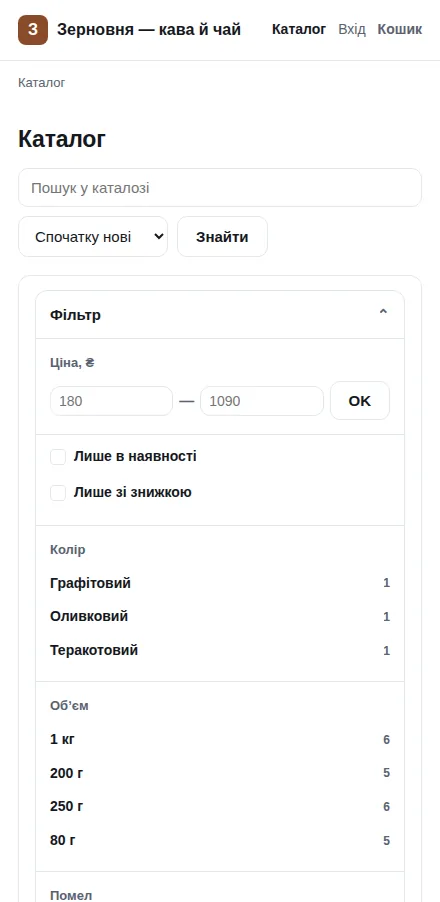
Storefront home page: shop name, a row of delivery and returns highlights, and product cards with prices and ratings
Fig. 1The storefront. Screenshots here come from a real shop on a test stand

Read this first

Built for one market, portable to others

The storefront ships in Ukrainian, and the carriers, payment providers and fiscal service it integrates with are Ukrainian: Nova Poshta and Ukrposhta for delivery, LiqPay, monobank and WayForPay for payments, Vchasno.Kasa for fiscal receipts, and 1C for stock exchange.

Everything else — the catalogue, variants, pricing rules, discounts, cart and checkout logic, orders, reports and marketplace feeds — is market-neutral. Adapting the store to another country means writing adapters for that country’s carriers, payment providers and fiscal rules, against the same interfaces the Ukrainian ones use. We say this up front so the screenshots below are read for what they show, not for the language they are in.

An order becomes work

From the order card, one click creates a task for a manager — with the contacts, the cart contents and the total inside it.

The buyer is the same record as in CRM

The customer card has a “Call” button and the full history of calls with that number: telephony here is not an integration, it is the next section along.

One server, one bill

No monthly platform fee, no commission on turnover, no product limit inside a plan. There is your hosting.

Your customer base stays yours

Buyers, orders and history do not live in someone else’s back office that you will one day have to export “as best you can”.

Catalogue · filters · search

The buyer finds what they came for

The sidebar filter counts products before anyone clicks: every value carries a number. There is no way to land on an empty “nothing found” page through your own filter.
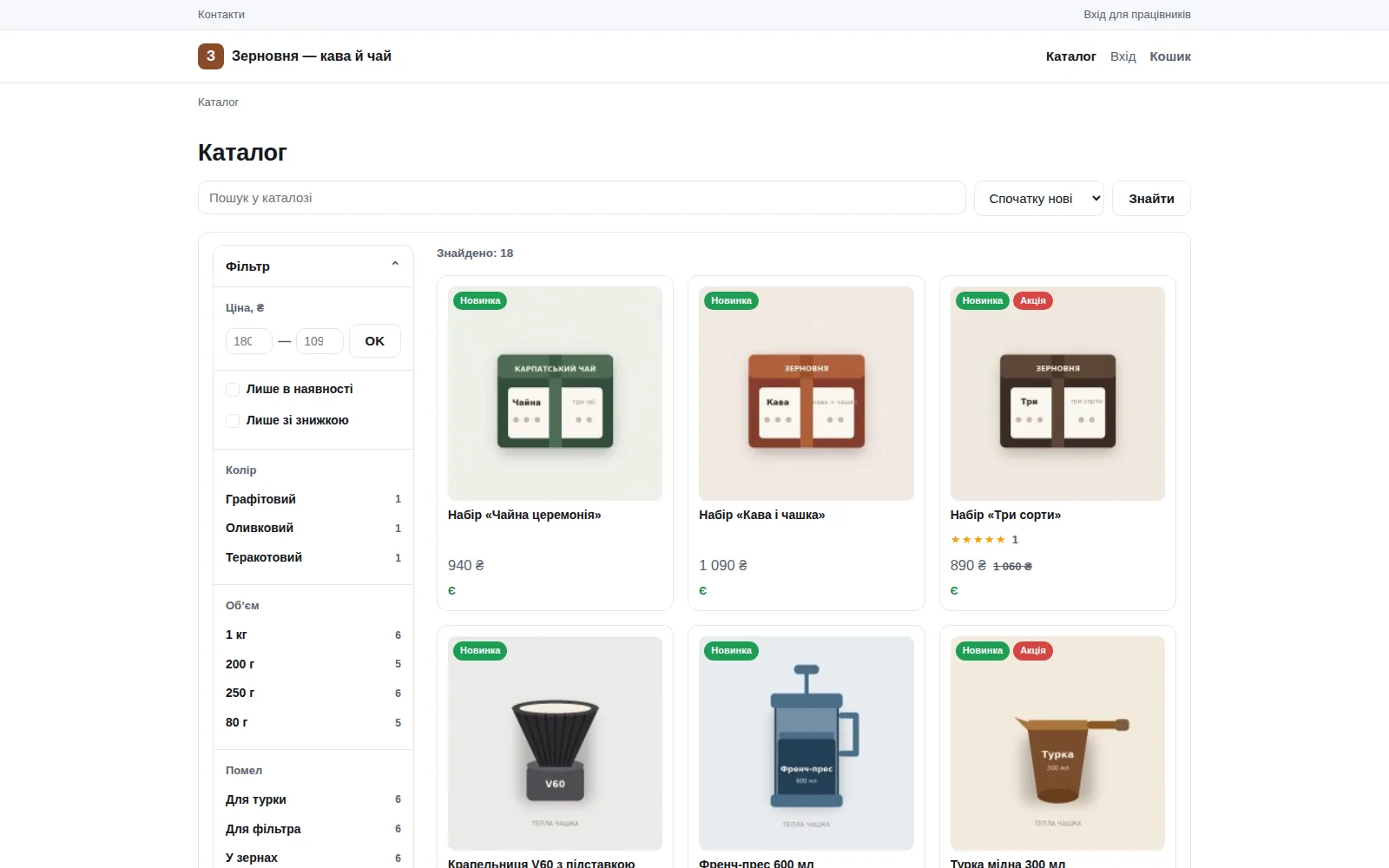
  • Price, brand, availability, discount — plus every variant axis separately: size, colour, volume.
  • Conditions across axes must be satisfied by ONE variant. “Large blue” will not return a shirt that has a large red and a small blue — which is exactly how most filters get it wrong.
  • Every filter state has its own URL. It can be shared, bookmarked and returned to with the Back button — the selection survives search and pagination.
  • Search suggestions appear from the third character: six rows with a photo and a price, one click to the product.
  • Related products under the card — same category, similar price.
your-store.com/catalog
Catalogue page: sidebar filter with price, availability, colour, volume and grind, each value showing the number of products
Fig. 2Catalogue with the filter. The count next to a value is visible before you click

Product variants

One card, a warehouse underneath it

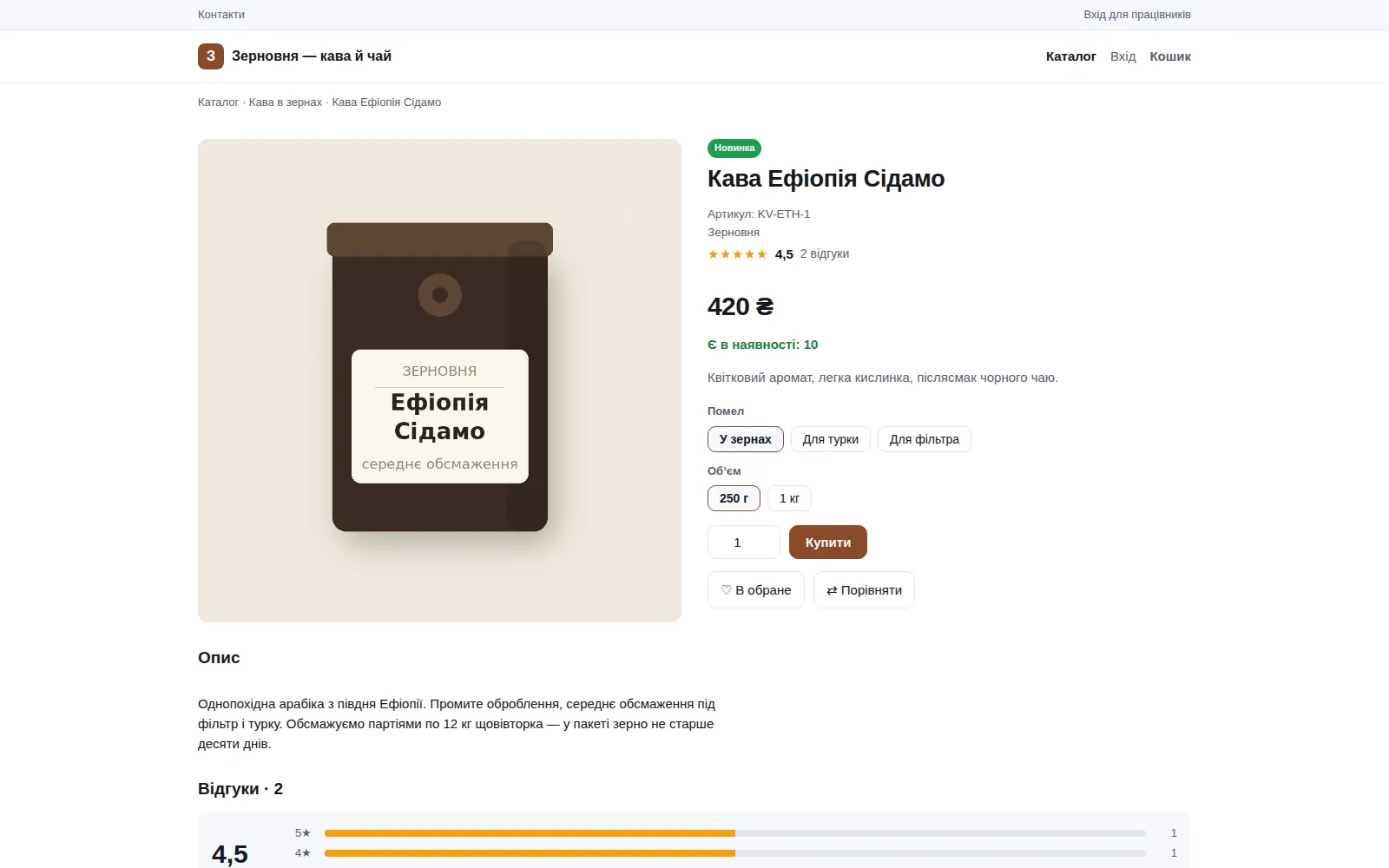
Size, colour, volume, grind. In the catalogue it is one product; in the warehouse these are separate units with their own SKU, price and stock. The card shows a price range when variants cost differently.
  • Selection works without JavaScript. These are ordinary radio buttons in a form; the script only refreshes price, stock and photo. A store that cannot sell without scripts loses buyers silently.
  • An impossible combination is not hidden. The page says “this combination does not exist” and disables the button, instead of quietly removing the option and leaving the buyer to wonder where it went.
  • A photo per colour. The image is attached to the colour value and swaps on the storefront the moment the colour is chosen — one photo per colour, not one per combination.
  • The variant label is frozen into the order, the confirmation email and the fiscal receipt. Rename a colour six months later and old receipts stay as they were.
  • “Notify me when it is back” is offered right on the card of a sold-out variant. The email goes out once, and only when the stock is genuinely free of reservations.
your-store.com/product
Product page on the storefront: photo, price, availability, two rows of choice buttons, buy button, wishlist and compare
Fig. 3Two axes of choice on the card. Price and stock follow the selection

Created in bulk, not one by one

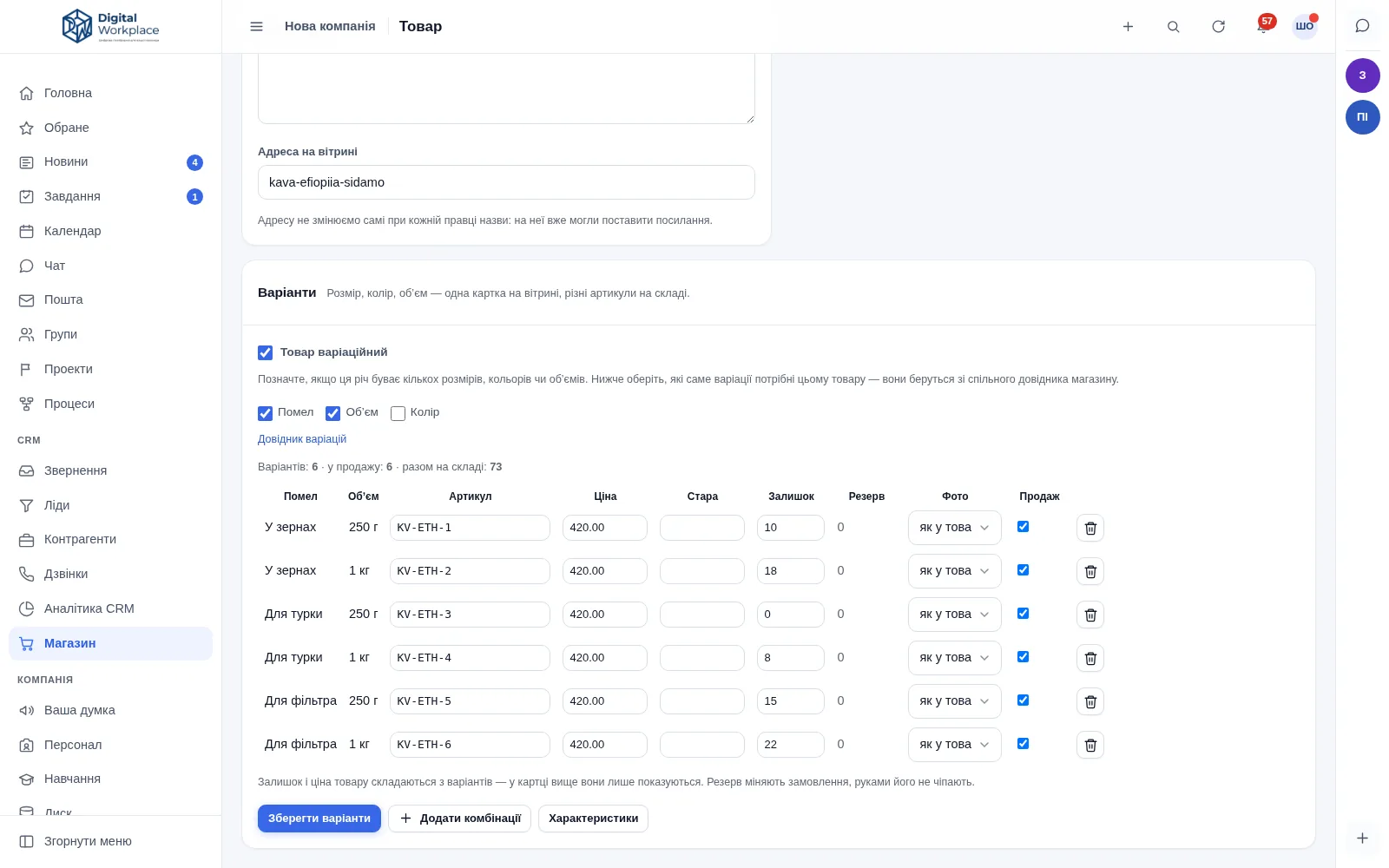
You mark which axes this product needs, and the portal offers to create every combination at once — telling you in advance how many that will be. The table is then edited in place: SKU, price, stock, photo, “sellable” — without opening each variant.

For a product with variants, “Price”, “Old price” and “Stock” become read-only. They are derived from the variants, and leaving a field to type into would mean two different truths about the same product.
portal.your-company.com/shop
Product card in the back office: variant axis checkboxes and a six-row table with SKU, price, stock, reserved and photo
Fig. 4The variant table. Six combinations, each with its own SKU and stock

Cart · discounts · delivery

A total that does not change on the last step

The most common reason a cart is abandoned is a price that grew on the payment page. So the delivery cost sits next to every method before it is chosen, and the total recalculates with it.
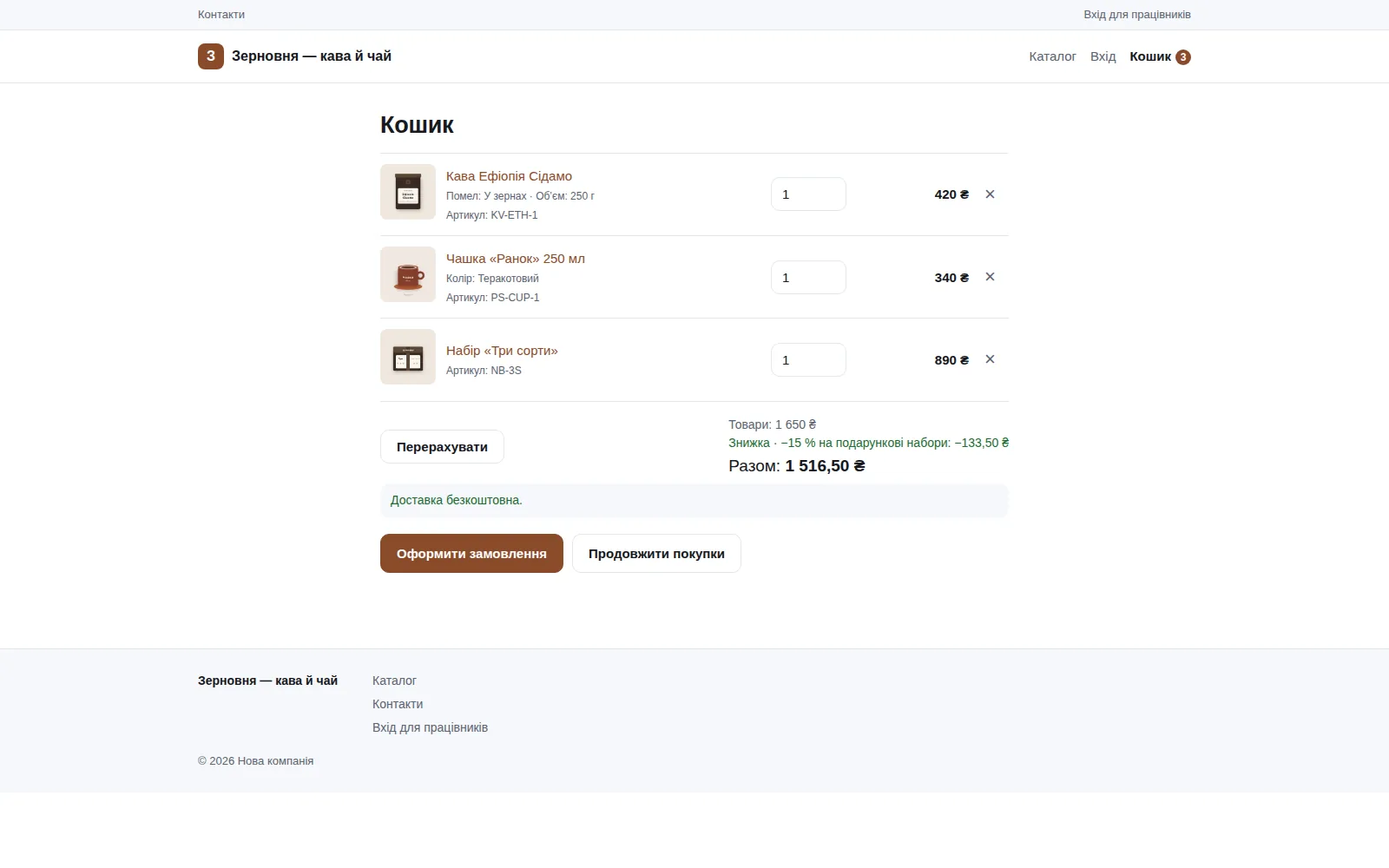
  • One mechanism for every kind of discount: promo code, order-total discount, category discount, a personal rate for a customer, free delivery.
  • Discounts do not stack. The best one for the buyer applies, and the cart says which. If the entered code loses to a running promotion, the promotion applies — and the page says so out loud.
  • “Add N more for free delivery” — an actual number, not a hint. The threshold is measured on the total after the discount, which is what the buyer actually pays.
  • The promo code is re-checked at the moment of “Place order”: the total is never taken from the page the browser sent back.
  • Wishlist and compare. Up to a hundred items in the wishlist and eight in a comparison table with differences highlighted. A guest’s wishlist moves into their account when they sign in.
your-store.com/cart
Cart with three lines: each showing its variant label, the line total on the right, then the category discount and the order total
Fig. 5The cart. Variant labels under each item, the discount named in the total

Delivery: four rules per method

Free, a flat fee, free above a threshold, or the carrier’s own tariff — set separately for each delivery method you offer.
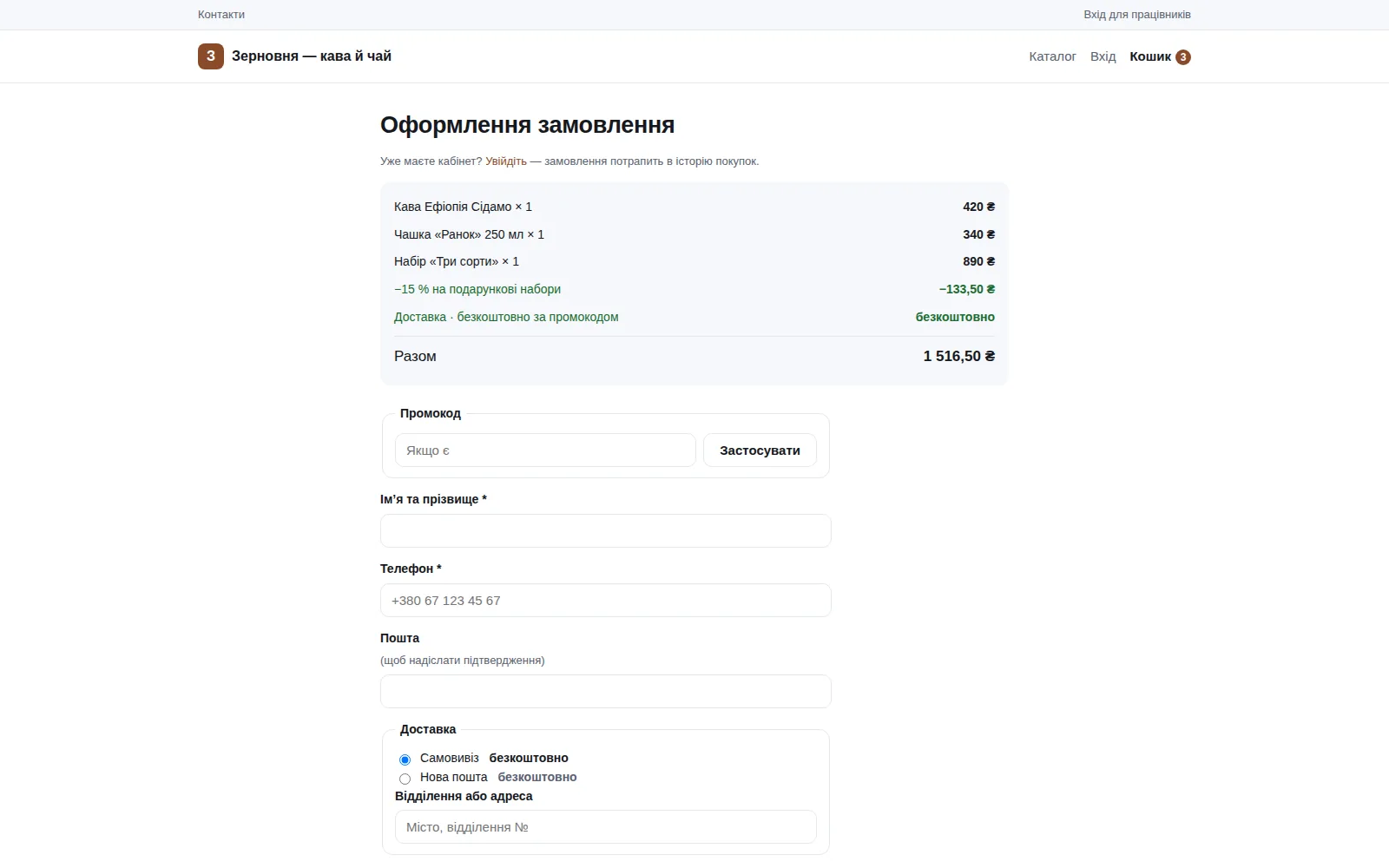
  • Carrier integration for branch selection, waybills created from the order card or in bulk from the list, and parcel status flowing back into the portal.
  • It works without an API key too — the buyer types the postcode themselves, and the found office is remembered for the next customer.
  • The cost freezes into the order together with the reason it came out that way. A month later you see not just the amount but the rule behind it.
  • In the revenue report, delivery is a separate number — money the store passes to the carrier, not money it earns.
your-store.com/checkout
Checkout page: order summary with the discount, promo code field, contact fields and delivery methods with a price beside each
Fig. 6Checkout. The delivery price sits next to the method before it is chosen

Abandoned carts come back by email

If someone left their email and walked away, the portal sends one reminder after a configured number of hours, with a link that restores the cart — no sign-in, and from a different device. One email per cart, and only to someone who left the address themselves.

The email carries a promo code, and specifically one that is still valid: an expired code in a reminder is worse than no code at all.
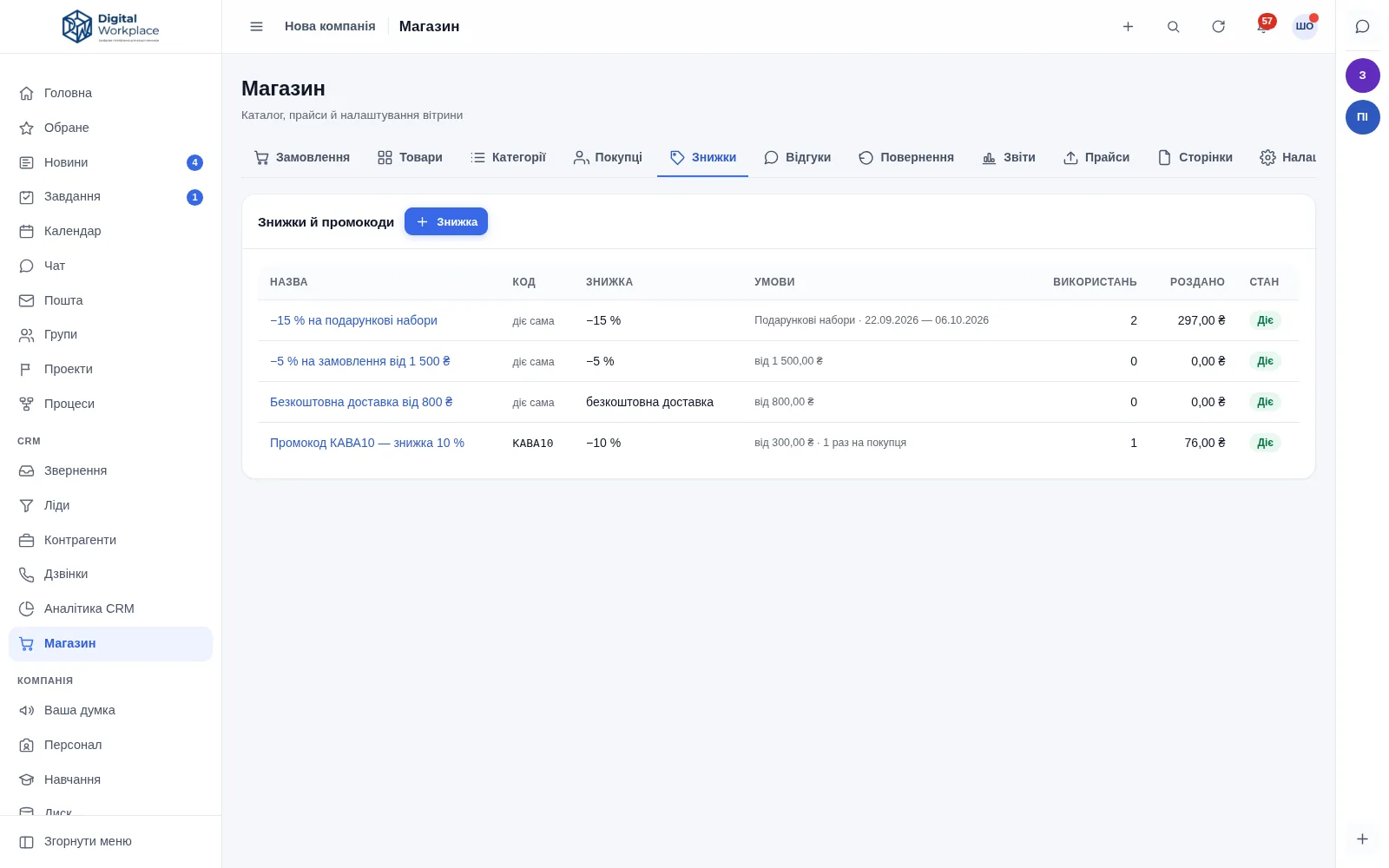
portal.your-company.com/shop/discounts
Discounts section: a ten per cent promo code, free delivery above a threshold, an order-total discount and a category promotion
Fig. 7Discounts and promo codes in one list, with limits and a usage counter

Payments · fiscal receipts · refunds

Exactly one place marks an order paid

Three payment providers, a bank webhook, a manager’s manual mark and a scheduled re-check all lead into the same piece of code. It verifies the amount, refuses to do anything twice, and only then writes to the log, the fiscal receipt and Telegram.

3
payment providers
Two acquirers among them — a spare for the day one of them is down
6
banks for instalments
Pay-in-parts through the acquirer, with the number of instalments configurable
15
minutes, then we ask
The portal polls the bank about payments pending longer: a webhook is not a delivery guarantee
0
receipts that disagree
A receipt that does not reconcile with the order is not issued at all

A card payment is fiscalised as a card payment

For all three providers, not only the one connected first — otherwise the payment form on the receipt would disagree with how the money actually arrived.

Discounts spread across receipt lines

To the cent, with the variant label in the line. A receipt where the discount hangs as a single “minus 200” reads differently to an auditor than to your accountant.

Money goes back the way it came

Refunds return through the provider that took the payment. Cash and bank-transfer refunds are recorded too, so nothing in the report ends up as “it went somewhere”.

Return requests from the order page

The buyer picks the lines and writes a reason; the amount is computed per line including the discount, and they see the manager’s decision with its explanation.

Working the orders

Thirty orders in one action

Tick them, then change the state, assign an owner, create waybills or send an SMS. The selection survives pagination, and every order still goes the normal route: reservation, stock write-off, promo code, log entry, message to the buyer.
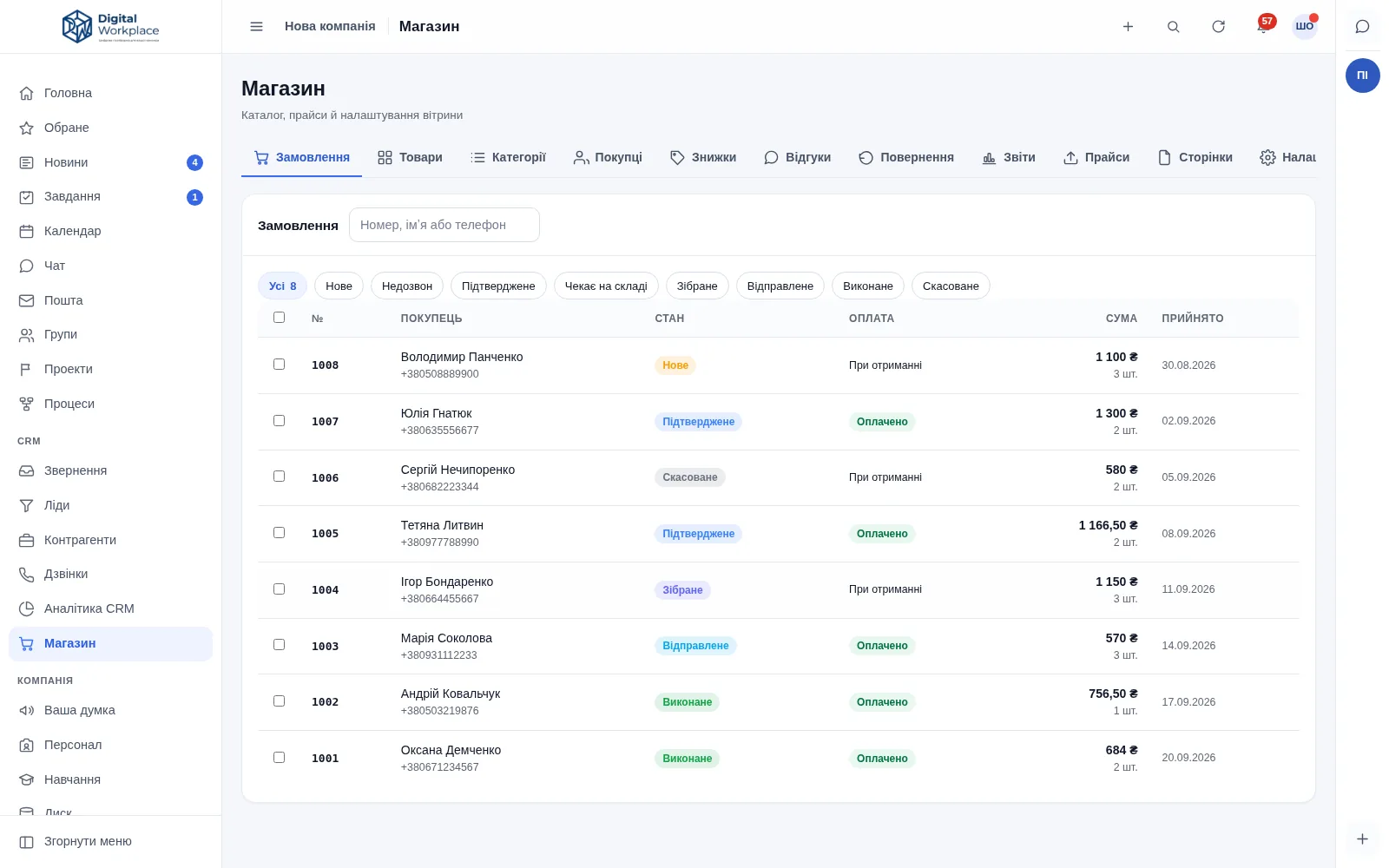
  • After a bulk action you see what did NOT go through — with order numbers and reasons. “Done” without that list means “something happened to thirty orders and we do not know what”.
  • Your own order states: “No answer”, “Waiting at the warehouse”, “Customer declined”. Each rests on one of six built-in ones, so the portal still knows whether to hold the reservation and whether the order counts as fulfilled.
  • A state with orders in it is disabled, not deleted. Deleting it would leave old orders with no state at all.
  • Printable picking slip with checkboxes next to the lines, and a sales receipt — one page per order.
  • SMS to the buyer with your own text per state. One message per order and per reason: an order moved back and forth will not send a second SMS.
portal.your-company.com/shop/orders
Order list: checkboxes for bulk actions, colour-coded states, payment column, totals and dates
Fig. 8The order list. The chips along the top are states, including your own

The order card holds everything

Buyer contacts, delivery method with the address, payment method and the paid mark, the line items with SKUs, the discount and the delivery as separate rows, buttons for the waybill and the fiscal receipt, the change history and a “Create task” button.

The SKU in a line is frozen — exactly the one that existed at the time of the order. That matters when exporting to accounting, where a line must point at a specific stock unit rather than at the product card.
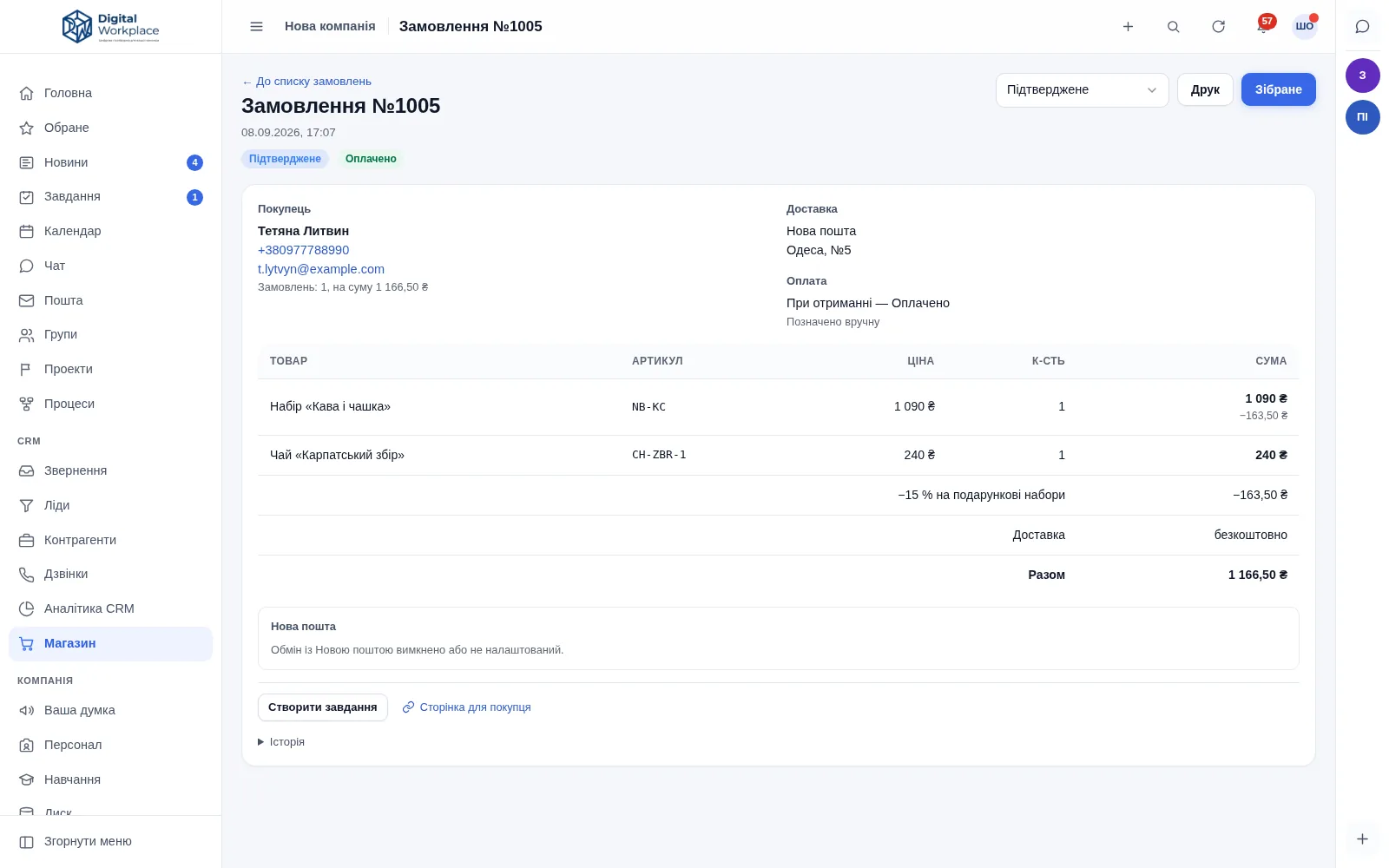
portal.your-company.com/shop/order
Order card: buyer, delivery, payment, the line items table with SKUs, the discount and the total
Fig. 9The order card. Discount and delivery are separate rows in the total

Feeds · pixels · reports

You can see which ads brought money, and which brought clicks

The source of an order is remembered from the first visit: utm tags, gclid, fbclid, ttclid and the referring domain. So the report shows the campaign the person first arrived through, not “direct”.
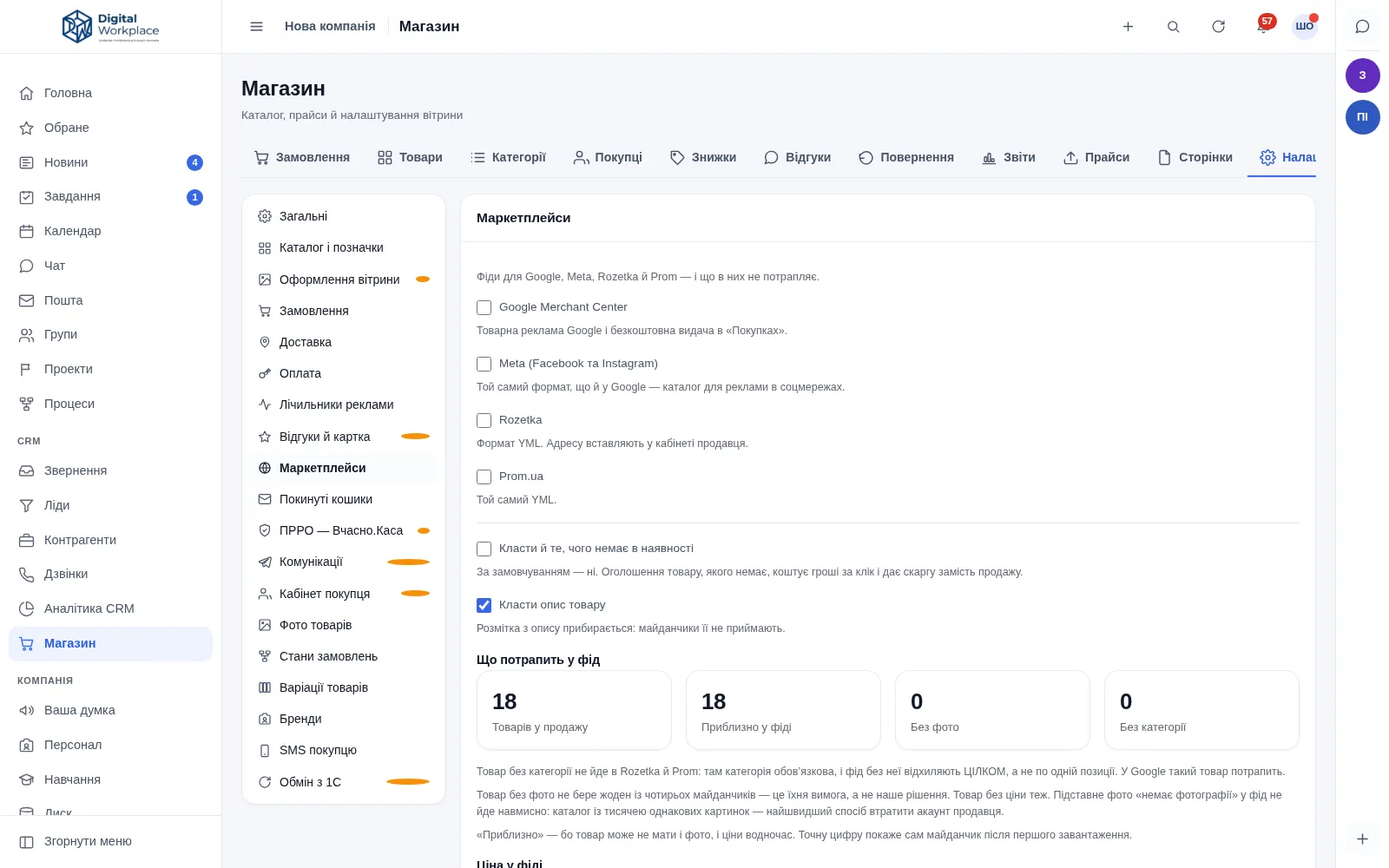
  • Four feeds on separate URLs: Google Merchant Center, Meta and two regional marketplaces. Variants go out as separate, linked offers, and size and colour land in the marketplace’s own fields.
  • You see how many products will NOT make it into the feed, and why: no photo, no price, no category. Otherwise you learn it from the marketplace — a week later and in a worse form.
  • The feed price equals the page price, promotion window included. A mismatch here costs impressions: that is precisely what marketplaces pull listings for.
  • GA4, Google Tag Manager, Meta Pixel and TikTok with view, add-to-cart, checkout and purchase events. Purchase fires exactly once per order, even if the thank-you page is opened again.
  • Pixels run on the storefront only, never inside the portal: how the company works is not something to ship into someone else’s analytics.
portal.your-company.com/shop/settings
Marketplace settings: feed switches for Google, Meta and two marketplaces, and counters showing how many products will be included and how many lack a photo or a category
Fig. 10Feeds. The portal says in advance how many products will be rejected, and why

Reports that compare against themselves

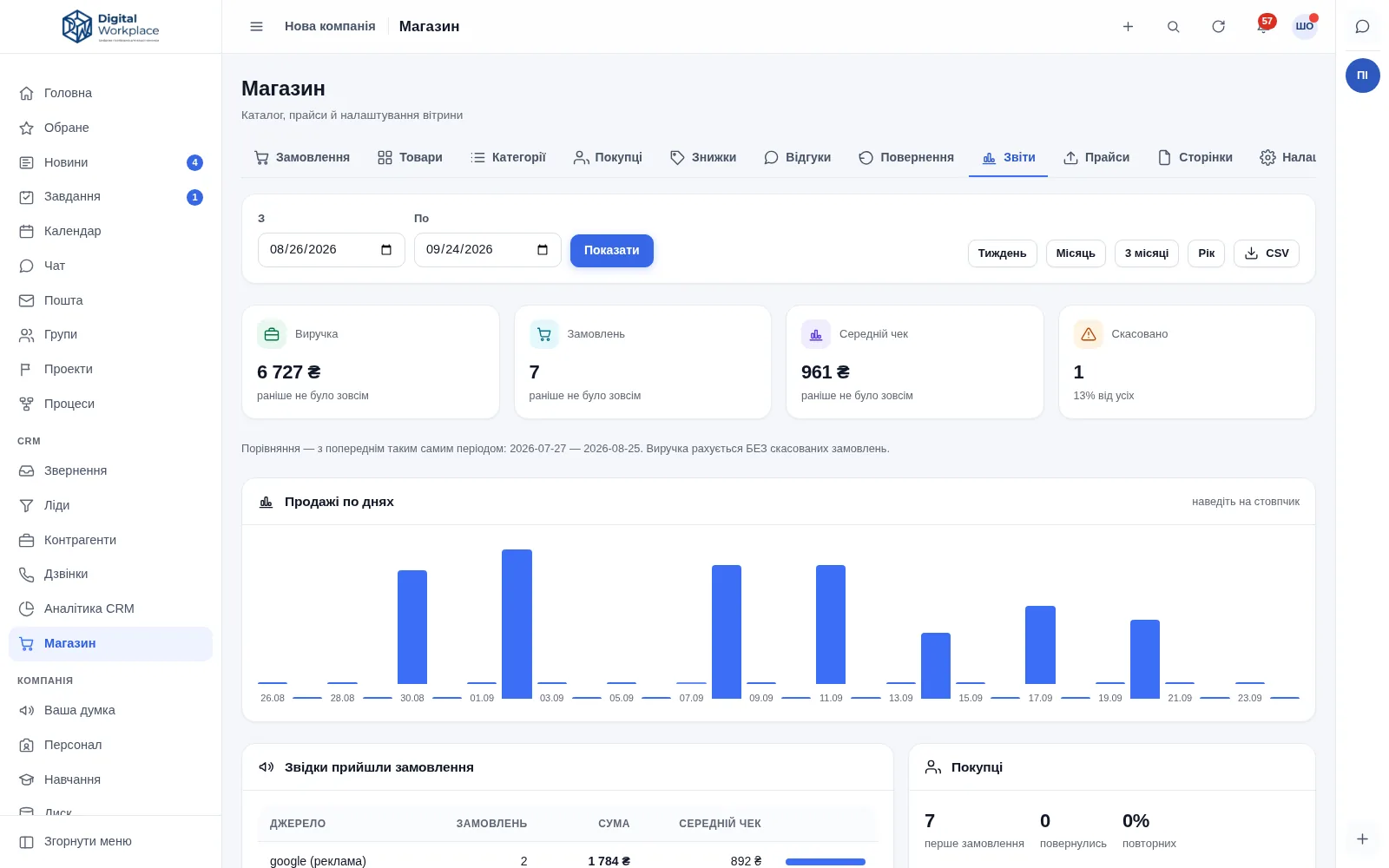
Revenue, orders and average order value — with the same previous period beside them. Revenue excludes cancelled orders, and cancellations are shown as their own number: hiding them would paint a better picture than the real one.
  • Sources and campaigns — with revenue and average order value for each.
  • Discounts: “given away” next to “orders worth” — so you can see whether a promo code paid for itself.
  • Products, states, returning customers, and delivery’s share of revenue.
  • Daily sales as CSV, to reconcile against ad spend or a bank statement.
portal.your-company.com/shop/reports
Store reports: revenue, orders, average order value and cancellations as tiles, a daily sales bar chart and a sources table
Fig. 11Reports. Every number carries the same previous period beside it

Price lists · accounting sync · directories

The catalogue is not filled in by hand

A supplier price list is read forgivingly: “1 234.50”, “1234,5”, “1 234.50 USD” and a non-breaking space inside the number all mean the same one thousand two hundred and thirty-four and a half — not one currency unit and some change.

Two columns for variants

“Model” is the card SKU, “Variant” is “Size: M, Colour: Red”. Axes and values are created automatically, and “M”, “m” and “ M ” collapse into one value.

Export, fix in a spreadsheet, import back

The export and the template carry the same columns as the import — variants included. A thousand rows can be edited where that is actually comfortable.

Stock sync by SKU or GUID

It updates a specific variant. A card SKU sent for a product that has variants is rejected with an explanation rather than written silently — otherwise the stock would land on “the product in general”.

Brands and variations are directories

“Samsung”, “SAMSUNG” and a local spelling merge in one action — together with the products, the filter, the feeds and the exports. A brand with products behind it is disabled, not deleted.

Customer account

An order page with no password

An order opens at its own tokenised URL — the buyer neither registers nor remembers a password. Registration stays available for people who want a purchase history, but it is never a condition of buying.

  • Reorder in one click — the previous cart comes back in full.
  • Reviews from verified buyers are marked as such. Reviews can be restricted to buyers only — and then the stars under a product mean something.
  • Sign in with Google for people who would rather not have a password.
  • “Unsubscribe” in an email removes every subscription for that address at once, not one mailing out of three.
your-store.com
Storefront on a phone: the filter collapsed into a button, product cards in a single column
Fig. 12The storefront on a phone — where most orders come from

Pricing

A separate module, priced separately

The store is not part of the portal price and is bought on its own. It does need the portal: the catalogue, orders and customers live in its database and use its permissions, tasks and telephony.

Step one

The portal

Perpetual licence or subscription · quoted per company
  • 24 modules: tasks, projects, CRM, telephony, files, mail, knowledge base
  • Your server, your database, full source code
  • No per-seat pricing
Portal pricing
Step two

The store

Its own update package · quoted per company
  • Storefront, filtered catalogue, variants, cart and checkout
  • Carrier, payment and fiscal integrations (Ukrainian by default)
  • Marketplace feeds, ad pixels and reports
  • Price-list import, accounting sync, Telegram bot, SMS to buyers
Ask for a quote

The store ships as its own package with its own version numbers. That is not a formality: a portal update does not touch the store, and a store update does not touch the rest of the company’s work.

Contact

Tell us what you sell

One call is enough to tell whether the store fits your product — and what would have to be built for your delivery and payment rules. We can show it working the same day.

+380 97 384 64 72

Call or message — we answer on both

Digital Workplace · corporate portal The store is a separate module +380 97 384 64 72 Українською digitalworkplace.myukr.biz